问题
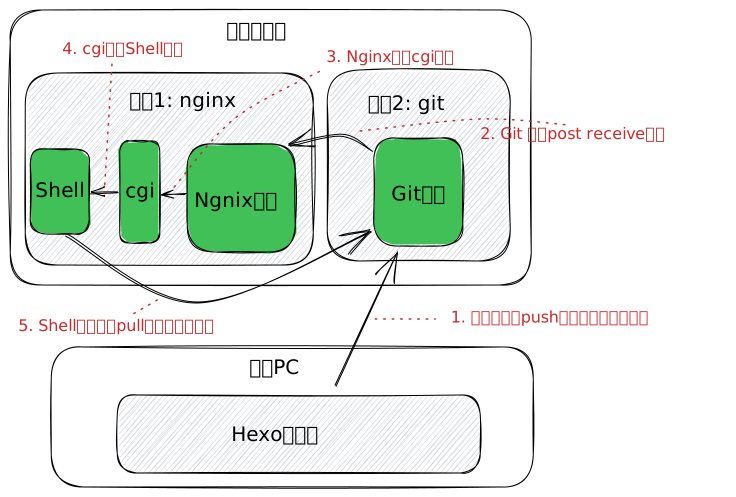
Git 和 Nginx不是同一个用户,现在需要他们联系上,以便在Git有更新后Nginx可自动以更新网站内容。第一个方案是Git通过访问ngnix服务器,ngnix通过cgi运行shell脚本更新。
CGI搭建
fcgiwrap
在Arch Linux上安装fcgiwrap是比较顺利的, 用命令pacman -Sy fcgiwrap 搞定,但启动就一直失败了。 需参考文章
https://sleeplessbeastie.eu/2017/09/18/how-to-execute-cgi-scripts-using-fcgiwrap/ 配置fcgiwrap.service
和fcgiwrap.socket.
fcgiwrap.service:
1
2
3
4
5
6
7
8
9
10
11
12
13
14
| [Unit]
Description=Simple CGI Server
After=nss-user-lookup.target
Requires=fcgiwrap.socket
[Service]
Environment=DAEMON_OPTS=-f
EnvironmentFile=-/etc/default/fcgiwrap
ExecStart=/usr/sbin/fcgiwrap ${DAEMON_OPTS}
User=nginx
Group=nginx
[Install]
Also=fcgiwrap.socket
|
fcgiwrap.socket:
1
2
3
4
5
6
7
8
| [Unit]
Description=fcgiwrap Socket
[Socket]
ListenStream=/run/fcgiwrap.socket
[Install]
WantedBy=sockets.target
|
按这个配置完后,才可通过systemctl start fcgiwrap启动服务,但仍不能systemctl enable fcgiwrap. 由于不影响使用,先不管了。
配置nginx
先跑一个简单的配置, 加一个location:
1
2
3
4
5
6
7
8
9
10
11
12
13
| location /index.cgi {
root /home/nginx/srv/cgi;
fastcgi_intercept_errors on;
include /etc/nginx/fastcgi_params;
# fastcgi_param DOCUMENT_ROOT $document_root;
# fastcgi_param SCRIPT_NAME $fastcgi_script_name;
fastcgi_param SCRIPT_FILENAME $document_root$fastcgi_script_name;
fastcgi_pass unix:/var/run/fcgiwrap.socket;
}
|
2个注意点:
- index.cgi 放在目录/home/nginx/srv/cgi/index.cgi, 必须可执行
$document_root和$fastcgi_script_name的$前面不要加\
配置完后运行systemctl reload nginx就可以通过www.chhwang.uk/index.cgi访问了。
正式配置
1
2
3
4
5
| http/
| -- update.cgi
| -- hexo/
| | -- .git/
| | -- index.html
|
1
2
3
4
5
6
7
8
9
10
11
12
13
14
15
16
17
18
19
20
| location / {
root /home/nginx/srv/http/hexo/public;
index index.html index.htm;
}
location ~ /*.cgi {
# only allow local access
allow 127.0.0.1;
deny all;
# Root directory
root /home/nginx/srv/http;
# FCGI params
fastcgi_intercept_errors on;
include /etc/nginx/fastcgi_params;
fastcgi_param SCRIPT_FILENAME $document_root$fastcgi_script_name;
fastcgi_pass unix:/var/run/fcgiwrap.socket;
}
|
1
2
3
4
5
6
7
8
9
10
11
12
13
14
15
16
17
| #!/bin/bash
echo "Content-type: text/html"
echo ""
echo "<html>"
echo "<head>"
echo "<meta http-equiv=\"Content-Type\" content=\"text/html; charset=UTF-8\">"
echo "<title>Bash CGI script</title>"
echo "</head>"
echo "<body>"
echo "<p>"
echo "$(git -C hexo pull)"
echo "</p>"
echo "</body>"
echo "</html>"
exit 0
|
修改服务器仓库的 hook/post_receive文件:
1
2
| #!/bin/sh
curl localhost/update.cgi
|
该文件使提交git成功后自动访问localhost/update.cgi,从而达到自动更新目的。
整体工作环境图
小结
- 优点
- 打通了从push到git后自动更新网页
- 网页服务和源码托管服务独立分离
- 工作站相对比较自由,可离线写作
- 缺点
- Hexo源码和Public未分离彻底
- 如果想多处部署的话,还得改进